
Odoo allows us to make the custom addons which can be for modify the existing features / function of odoo or you can create a custom logic base on the requirements as well through the custom addons.
How to make new module in odoo 19
1. make a directory inside addons folder and name it as estate
A module must contain at least 2 files: the __manifest__.py file and a __init__.py file. write detail of your module in manifest.py file. if you want to set icon of your module then add icon.png image inside description directory as shown below. (note: name must be icon.png)
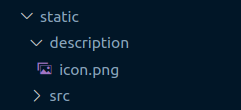
2.mention the path of your module on addon_path.
3.then open odoo on your browser, go to App section , click on update App List to update app, then search for the module that you just created. you will see their , estate as below.
make sure the estate module is installed, i.e. it must appear as “Installed” in the Apps list.(if you want to activate module then click on activate button.)
Congratulation you have successfully created your first app (module) in odoo.