
Odoo is an open-source suite of integrated business applications designed to help businesses manage and automate various aspects of their operations. Originally known as OpenERP, it was rebranded as Odoo to reflect its broader scope beyond ERP (Enterprise Resource Planning) functionalities.
Here are some key aspects of Odoo:
- Modular Structure: Odoo is built on a modular structure, which means that it consists of a collection of applications or modules that can be installed and configured based on the specific needs of a business. These modules cover a wide range of business functions such as accounting, CRM (Customer Relationship Management), sales, inventory management, project management, manufacturing, human resources, e-commerce, and more.
- Integration: One of the key features of Odoo is its ability to integrate different business processes seamlessly. Since all the modules are part of a single platform, data can flow between them without the need for manual intervention. For example, sales orders can automatically update inventory levels, and customer information can be shared between the CRM and the sales modules.
- Customization: Odoo offers a high degree of customization, allowing businesses to tailor the system to their specific requirements. This includes customizing workflows, adding new fields, and creating custom reports. Additionally, Odoo's open-source nature means that developers have access to the source code, enabling them to modify the system's behavior as needed.
- User Interface: Odoo features a modern and intuitive user interface that makes it easy for users to navigate and perform tasks. The interface is designed to be user-friendly and customizable, allowing users to personalize their workspace according to their preferences.
- Community and Support: Odoo has a large and active community of users, developers, and partners who contribute to its development and provide support to users. The community edition of Odoo is free and open-source, while the enterprise edition offers additional features and support services for a fee.
- Scalability: Odoo is designed to scale with businesses of all sizes, from small startups to large enterprises. As a business grows and evolves, additional modules and functionalities can be added to accommodate changing needs.
- Cloud and On-Premises Deployment: Odoo can be deployed either on-premises or in the cloud, giving businesses flexibility in how they choose to host and manage their system.
Overall, Odoo provides a comprehensive and flexible solution for businesses looking to streamline their operations, improve efficiency, and drive growth. Its modular architecture, customization options, and integration capabilities make it a popular choice for organizations across various industries.
Odoo follows a multitier architecture, meaning that the presentation, the business logic and the data storage are separated. More specifically, it uses a three-tier architecture.
The presentation tier is a combination of HTML5, JavaScript and CSS. The logic tier is exclusively written in Python, while the data tier only supports PostgreSQL as an RDBMS.
odoo module
Both server and client extensions are packaged as modules which are optionally loaded in a database. A module is a collection of functions and data that target a single purpose.
Odoo modules can either add brand new business logic to an Odoo system or alter and extend existing business logic
Everything in Odoo starts and ends with modules.Modules may also be referred to as addons and the directories where the Odoo server finds them form the addons_path.
Composition of a module
An Odoo module can contains a number of elements. odoo module structure is as below:
module
    models
  		 *.py
		 __init__.py
		 *model.py
	 security
		*.csv
		*.xml
	 views
		*.xml
	 data
		 *.xml
	__init__.py
	 __manifest__.py
An Odoo module is declared by its manifest. manifest file is simply the python file which contains meta data related to addons.
Simple structure of the manifest file is as follow.
#__manifest__.py
{
    'name': "Custom Module",
    'sequence':1,
    'summary': "Short summary of the module",
    'description': "Longer description of the module",
    'author': "Your Name",
    'website': "Your website URL",
    'category': "Category",
    'version': "1.0",
    'depends': ['base_setup'],  # Dependencies
    'data': [
        # List of XML files containing data for the module
    ],
    'assets': {
        'web.assets_backend': [
            'module_name/static/src/scss/file_name.scss',
        ],
    },
   'license': "AGPL-3",
    'installable': True,
    'application': True,
}
You can use odoo by using service provided by odoo company, for this follow below process
1. go to https://www.odoo.com/
2.create account for your company with all valid information
3.then you can use odoo service as SAAS.
Important links in for odoo developer are as follow:
http://localhost:8069/?debug=assets
http://localhost:8069/?debug=1
http://localhost:8069/web/database/selector/
http://localhost:8069/web/database/manager
http://localhost:8069/web/login


https://github.com/oca
https://odoo-community.org/shop
https://github.com/OCA/project
some important commands for odoo developer
./odoo-bin -c odoo.conf
How to setup odoo in local machine
In this article, we will learn how to setup odoo in our local system and make our first odoo application.
Note: in this tutorial we will discuss on odoo 19.
1 .go to official github repo ( ) and then clone repo on your local ystem as below
git clone --depth 1 --branch 19.0 https://github.com/odoo/odoo.git
Let's break down the command:
git clone: This command is used to clone a repository.--depth 1: This option ensures that only the latest commit history is cloned, saving time and disk space.--branch 19.0: This specifies that you want to clone the19.0branch of the repository.https://github.com/odoo/odoo.git: This is the URL of the Odoo repository on GitHub.
2.Then setup all you database configuration and other necessary setup to run the project
first you need to setup postgres database like
sudo su postgres

 #to create user or role in postgresql
 CREATE USER odoo16 WITH PASSWORD 'odoo19';

 #if you want to create user/role as a superuser
 CREATE USER odoo19 WITH PASSWORD 'odoo16' SUPERUSER;


 #create database in postgresql
 CREATE DATABASE odoo19;

 #grant priviliges for user to particular database
 GRANT ALL PRIVILEGES ON DATABASE odoo19 TO odoo19;
#odoo.conf
db_host=localhost
db_user=odoo19
db_password=odoo19
db_port=5432
addons_path=/home/dev/odoo19/odoo/addons (absolute path)
http_port=8069
admin_passwd=admin
3.make virtual environment and install all dependency (which yopu can find in setup folder)
4.Then run the command to run the odoo on local system.
python odoo-bin -w odoo19 -r odoo19  --addons-path /home/user/odoo/addons,/home/user/odoo/custom_addons


 # -w odoo19: Sets the database password to odoo16.
 # -r odoo19: Sets the database user to odoo16
After that you can access odoo through url : localhost:8086 on any web browser. you can see interface like below
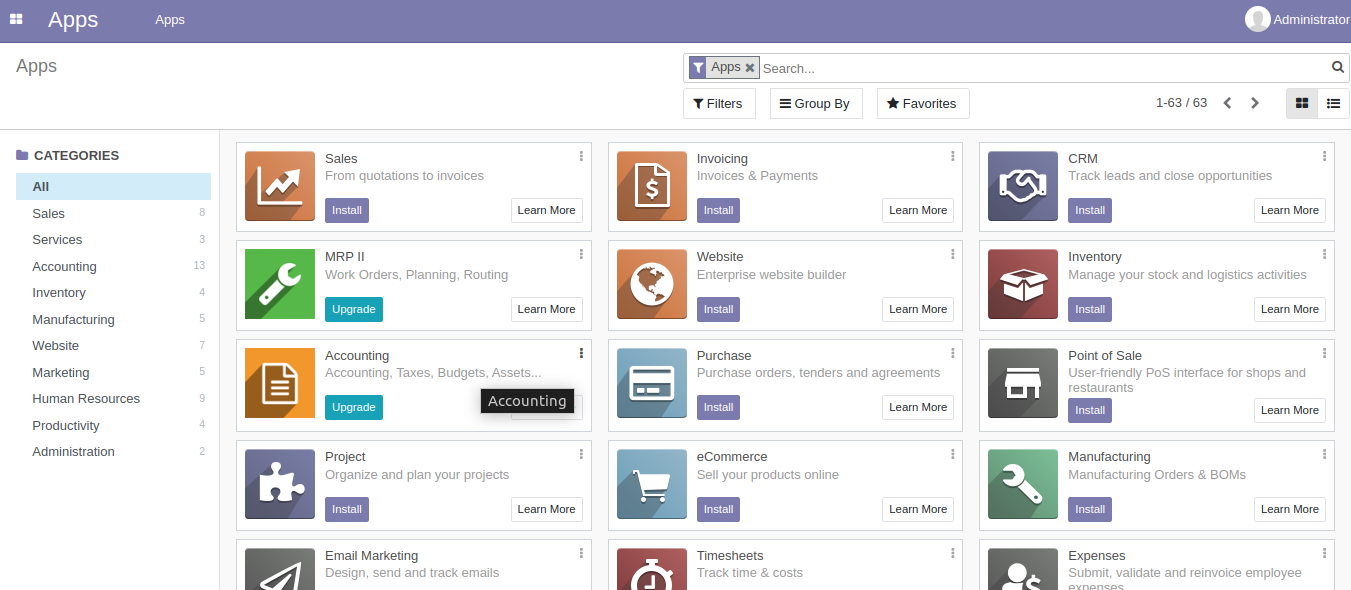
note: you can run odoo application in debugging mode directly through url like below (or you can change configuration of debuging through setting)
http://localhost:8069/?debug=assetsEnabling debug mode allows you to:
- See detailed logging information in the terminal.
- Use the browser's developer tools to inspect network requests, view JavaScript console messages, and debug JavaScript code.
Debugging mode is useful for troubleshooting issues, inspecting server responses, and debugging custom code and modules in Odoo. Make sure to disable debug mode in production environments for security and performance reasons.